ZERO POINT STAR / AUDIO TOOLS
Quantum Immortality
Capture a moment. Keep transforming it.
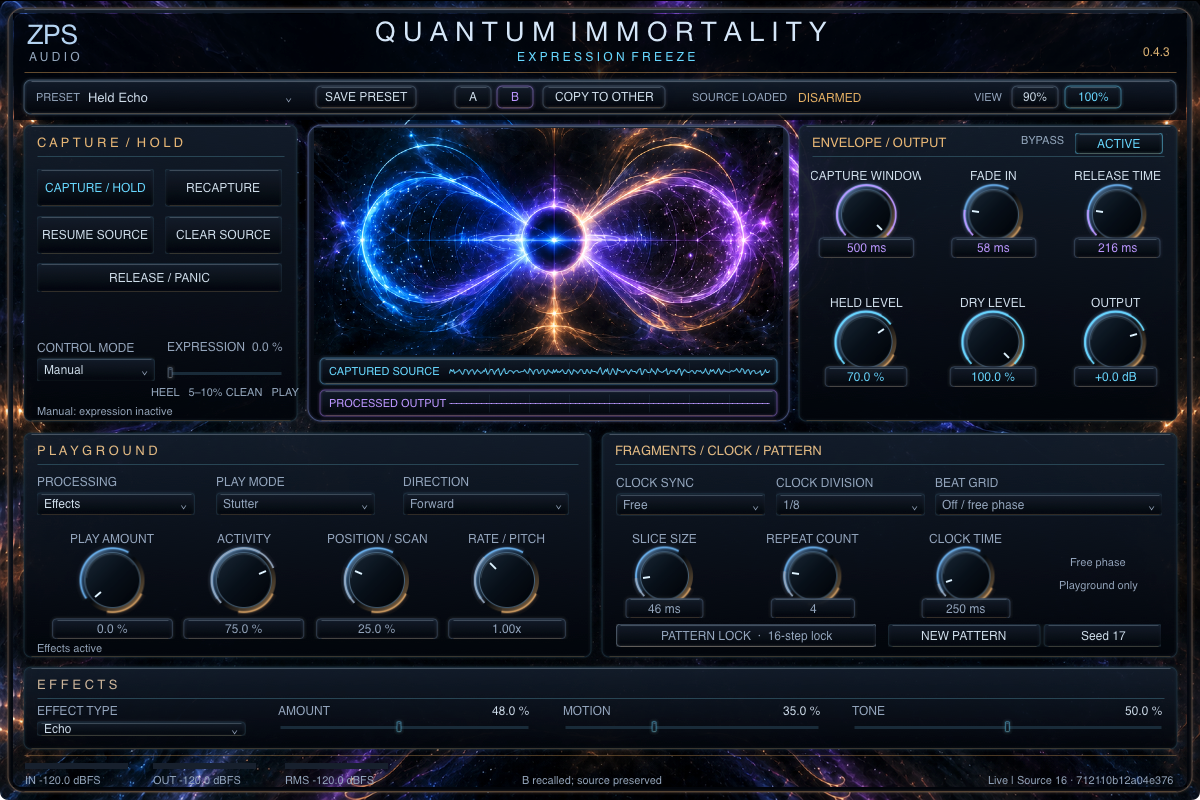
Retain incoming audio, then reshape that same source with Effects or Playground. Drive, Chorus and Echo; Stutter, Slice, Reverse and Scrub; Manual and Expression control, separate Dry and Held levels, timing controls and repeatable patterns.
$39.00 USD · one-time
Available on Gumroad
One-time purchase. Secure checkout, receipt and download through Gumroad. No membership required. Applicable tax is shown at checkout.
Quantum Immortality 0.4.3 with guarded installer, installation/removal guide, license and dependency notices. The tested app retains its Audition Installer title.
Intel x86_64 Mac; macOS 14 or later; compatible VST3 host and incoming audio required. No native Apple Silicon, Windows, Linux, AU, AAX or standalone edition.
Version 0.4.3 · macOS VST3 Early Access
These Mac packages are ad-hoc signed, not Developer ID signed or notarized. Read the exact installation and host limitations below; keep OS security enabled.
Buy Quantum Immortality — $39.00Software license
This purchase permits your own music-production use. Redistribution, resale, public uploading and sharing copies of the plugin or its artwork with other users are prohibited. No subscription or online plugin activation is required. These restrictions do not apply to music you create with the plugin. Mandatory consumer rights are not waived.
Early Access: read before downloading
Early Access. A manual hold can continue until released; reopening disarms a retained source. Recorded Live automation playback, hardware pedal/interface stress and screen-reader qualification remain unperformed. Ordinary browser-downloaded GUI/Gatekeeper installation is not qualified; macOS may block it. Keep OS security enabled and contact support if blocked.
macOS x86_64 · 0.4.3
macOS 14 or later
Exact privacy-clean payload passed native identity/default/state checks, 72 sample-identical audio comparisons, SDK47/0 and isolated installer checks. Earlier scoped Live evidence is inherited. Consumer GUI/Gatekeeper installation and hardware/recorded automation qualification are not claimed.
Exact file: Quantum-Immortality-0.4.3-macOS-Intel-VST3-EarlyAccess-privacy-r2.zip
3903552 bytes · SHA-256 29d7698dfc3f45f8c4665b3deded7efa190861bb070b45d65e246341aa979078
Mac packages are ad-hoc signed, not Developer ID signed or notarized. Installation may be blocked. Keep OS security enabled. If blocked, stop and contact support; do not remove quarantine or bypass warnings.
Installation limitations and existing instructionsGet started
- Pass your own audio through Quantum and start with quiet monitoring. Try the Clean Chord preset. Use Capture / Hold, then compare Effects with Playground. Release / Panic stops the hold; Clear Source removes it. Resume Source explicitly starts an existing retained source.
- Start with modest Held Level and Output. In Expression mode, heel releases, roughly 5–10% travel gives clean hold, and further travel transforms. Presets and A/B store settings without replacing source audio; reopening a saved session is disarmed.
A few details
What is included?
Quantum Immortality 0.4.3 Intel macOS VST3, guarded installer, installation/removal guide, license and required dependency notices.
Does it create sound without input?
It transforms your captured incoming audio. A new instance contains no captured source. Your own session may save captured audio; reopening remains disarmed.
Is membership or activation required?
No. This is a separate one-time purchase with Gumroad receipt and protected download. There is no online plugin activation.
What should I know before buying?
Early Access. A manual hold can continue until released; reopening disarms a retained source. Recorded Live automation playback, hardware pedal/interface stress and screen-reader qualification remain unperformed. Ordinary browser-downloaded GUI/Gatekeeper installation is not qualified; macOS may block it. Keep OS security enabled and contact support if blocked.